Teams copying data between tools
Staff who re-type the same information into email, spreadsheets, CRMs and accounting software.
Automate approvals, notifications and repetitive work. Upscaleads delivers Process Automation for businesses in Dubai and across the UAE.
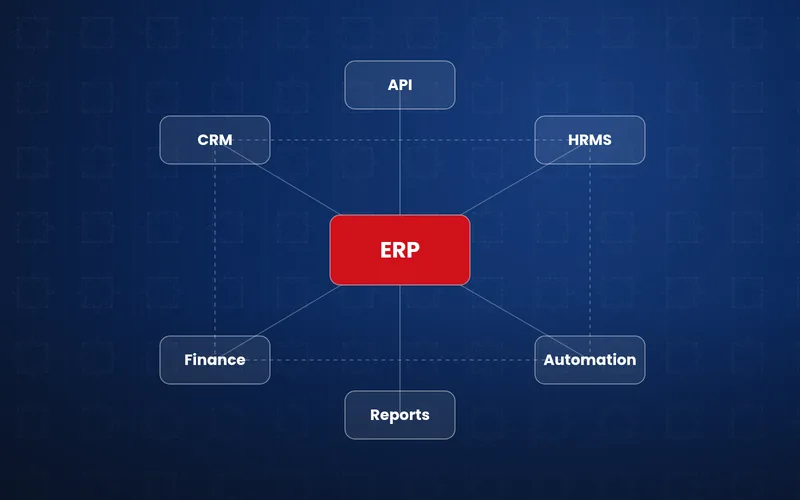
Business process automation uses software to carry out repetitive, rule-based tasks without manual effort, such as routing leads, sending approvals and reminders, generating documents and moving data between systems. It usually connects existing tools through platforms like Zapier, Make, n8n or Power Automate, or custom scripts. Upscaleads designs and builds automations for UAE businesses.
Many hours are lost to copying data, chasing approvals and sending reminders. Business process automation removes that repetitive work so your team can focus on customers and growth.
We map your processes, then build workflow automation, approval chains, notification systems, document automation and custom internal tools that fit how you work.
Automations are monitored so issues are caught quickly.
Staff who re-type the same information into email, spreadsheets, CRMs and accounting software.
Businesses where purchase, leave or discount approvals stall in inboxes and chat threads.
Teams that manually prepare quotes, contracts, invoices or reports from the same templates.
Small teams whose workload is rising faster than they can hire.
5 deliverables, scoped to your goals.
A structured process, with clear communication at every stage.
Document how work flows today, where time is lost and what data matters.
Define modules, user roles, integrations and a phased roadmap.
Develop in short cycles with regular demos and feedback.
Move and clean existing data from spreadsheets or legacy tools.
Train your team and support adoption during launch.
Maintenance, improvements and new modules as you grow.
We map where time is actually lost before choosing Zapier, Make, n8n, Power Automate or custom code.
We prioritise automations that save the most hours first, so you see value early.
We automate lead routing and follow-ups from ads and forms, not only back-office tasks.
Automations are documented and monitored, so failures are caught and your team knows how things run.
Common examples include lead routing, approvals, notifications, document generation, reporting, onboarding and data entry between systems.
Usually not. Most automation connects and extends the tools you already use.
An approval chain routes a request, such as a purchase or leave request, through the right people in order, with notifications and a clear record.
Yes. When off-the-shelf tools do not fit, we build simple internal tools around your process.
Cost depends on how many processes are automated, the number of systems involved, whether no-code platforms are enough or custom development is needed, error handling and monitoring requirements, and ongoing platform subscriptions. Starting with one or two high-value workflows keeps the first phase focused. We provide a tailored quote after a consultation.
An API integration connects two systems so data can pass between them. Business process automation uses integrations, rules and triggers to complete a whole task, such as capturing a lead, assigning it, notifying the salesperson and scheduling a follow-up. Most automations rely on integrations, but they focus on the complete workflow rather than a single connection.
Yes, we choose the tool that fits the job. Zapier and Make are quick to set up for connecting popular apps, while n8n can be self-hosted for more control over data and running costs. For complex or high-volume processes, we may write custom code instead. We explain the running costs and limits of each option before building, so there are no surprises later.
Often quite quickly. A single workflow, such as routing web enquiries or sending automatic reminders, can usually be delivered in a short time, and your team feels the time savings straight away. Larger multi-department automations take longer because they need process mapping, testing and training. We usually start with the process that wastes the most time, then build on that success.
Yes. Document automation creates quotations, invoices, contracts, offer letters and reports from templates, filling in customer and pricing data automatically. Documents can be produced in English or Arabic, sent for approval, signed electronically and emailed or shared on WhatsApp. Copies are saved to the right folder or system, which reduces typing errors and saves hours of repetitive admin work.
Yes. Approval requests for purchases, expenses, leave, discounts or payments can be sent by email, mobile app or messaging notification, with one-tap approve or reject buttons and space for comments. If someone does not respond in time, the system can send reminders or escalate to another approver. Every decision is recorded with a timestamp for accountability.
We design automations to fail safely. Each workflow includes error handling, automatic retries where appropriate and alerts to a named person if something cannot be completed, such as a missing field or an unavailable app. Logs show exactly what happened, so problems are quick to fix. With a maintenance plan, we monitor your automations and update them when connected apps change.
Usually not. Automation takes over repetitive tasks such as copying data, chasing approvals and sending routine updates, so your people can focus on customers, sales and decisions that need judgement. Most businesses use it to handle growth without adding admin workload. We design workflows with your team, so staff understand the changes and stay in control of important steps.
Yes. We can send automatic appointment reminders, payment due notices, order and delivery updates, renewal alerts and feedback requests by email, SMS or WhatsApp. Messages are triggered by events in your systems and can be personalised in English or Arabic. Internal notifications can also alert staff when a task is assigned, a deadline is near or a high-value lead arrives.
Yes, where it adds real value. AI can help sort incoming emails, extract data from invoices or forms, draft replies, summarise documents and answer common customer questions. We keep people in the loop for important decisions, check outputs for accuracy and consider data privacy before sending any information to an AI service. We recommend AI only where it clearly saves time or improves service.
Practical articles from our team on this topic.
Ten practical automation examples across sales, finance, HR and operations, with the tools involved and a simple framework for deciding what to automate first.
Four ways to send website form enquiries straight into your CRM, plus the fields, tracking data, consent and testing steps that make the integration reliable.
How UAE businesses can use WhatsApp Business to sell, support customers and track leads, from the free app to the WhatsApp Business Platform.
Book a consultation to identify which of your workflows can be automated and where your team will save the most time.